Exercise - 5 Data Control Language
2026-03-28 13:14
Tags: #ADV_DBMS
Author: Duke Hsu
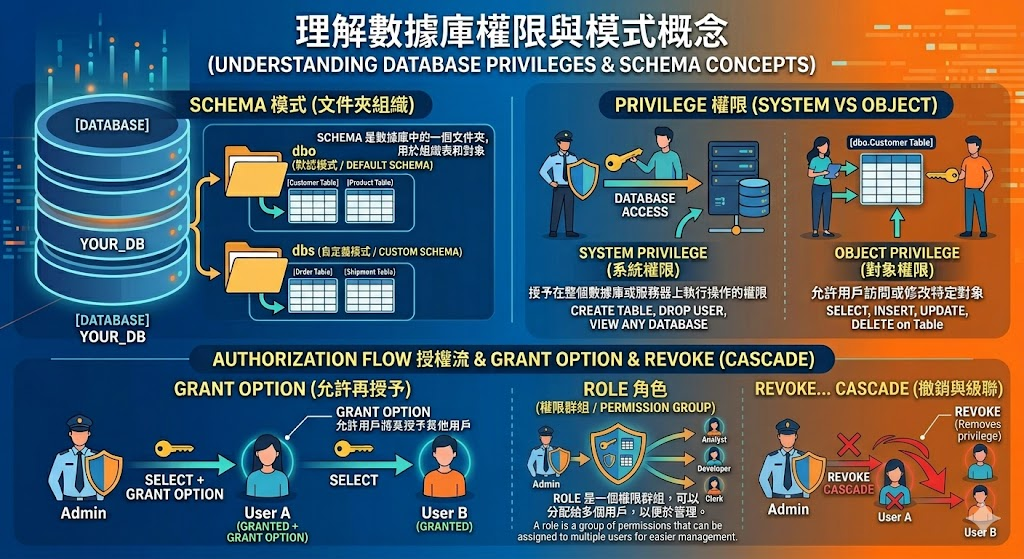
Key concepts
-
SCHEMA - A schema is a folder inside a database that organizes tables and objects.
-
dbo, dbs - These are schema names (like folders), where dbo is the default and dbs is a custom one.
-
System privilege - A system privilege gives a user permission to perform actions on the whole database or server.
-
Object privilege - An object privilege allows a user to access or modify a specific object like a table.
-
GRANT OPTION - It allows a user not only to use a privilege but also to give it to other users.
-
REVOKE , CASCADE - REVOKE removes a privilege, and CASCADE also removes all privileges given by that user to others.
-
ROLE - A role is a group of permissions that can be assigned to multiple users for easier management.
Concepts SQL Example:
 1
 2
 3
 4
 5
 6
 7
 8
 9
10
11
12
13
14
15
16
17
18
19
20
21
22
23
24
25
26
27
28
29
30
31
32
33
34
35 | -- Step 1: Create a schema
CREATE SCHEMA dbs;
-- Step 2: Create a table
CREATE TABLE dbs.regions (
region_id INT,
region_name VARCHAR(50)
);
-- Step 3: Create users
CREATE LOGIN duke WITH PASSWORD = 'P-LG9XTLqhtH';
CREATE LOGIN ora23 WITH PASSWORD = 'P-LG9XTLqhtH';
CREATE USER duke FOR LOGIN duke;
CREATE USER ora23 FOR LOGIN ora23;
-- Step 4: Create a role
CREATE ROLE sales_role;
-- Step 5: Grant permission to the role (object privilege)
GRANT SELECT ON dbs.regions TO sales_role;
-- Step 6: Add user to role
ALTER ROLE sales_role ADD MEMBER duke;
-- Step 7: Grant with GRANT OPTION
GRANT SELECT ON dbs.regions TO duke WITH GRANT OPTION;
-- Step 8: duke grants to another user
GRANT SELECT ON dbs.regions TO ora23;
-- Step 9: Revoke with CASCADE
ALTER ROLE sales_role DROP MEMBER duke;
REVOKE SELECT ON dbs.regions FROM duke CASCADE;
|
Assign schema ownership to a user
| -- Assign schema ownership to a user
ALTER AUTHORIZATION ON SCHEMA::dbs TO duke;
-- Change the ownership of a table
ALTER AUTHORIZATION ON OBJECT::dbs.regions TO duke;
-- Change the ownership of a stored procedure
ALTER AUTHORIZATION ON OBJECT::dbs.sp_GetEmployees TO duke;
-- Change the ownership of a database
ALTER AUTHORIZATION ON DATABASE::A102 TO duke;
|
Check users
| SELECT name
FROM sys.database_principals
WHERE name = 'duke';
|
Users drop
| DROP USER duke; -- delete user from sys.database_principals
DROP LOGIN duke; -- delete user from login
|
Flowchart
flowchart TD
A[LOGIN System Level] --> B[USER Object Level]
B --> C[ROLE Permission/Privilege Group]
C --> D[PERMISSION/Privilege SELECT, INSERT, UPDATE]
B --> D
References