LAB Class Note 02182026
2026-02-19 13:54
Tags: #ADV_DBMS Author: Duke Hsu
Lab Notes: MSSQL Debugging Approach
Basic step
- Check the message window and pay attention to the table or column information.
- Use
EXEC sp_help 'departments' ;to check the table structure - Verify the foreign keys and primary keys in the table.
- Check the data content and structure.
- Look for any syntax errors.
Example
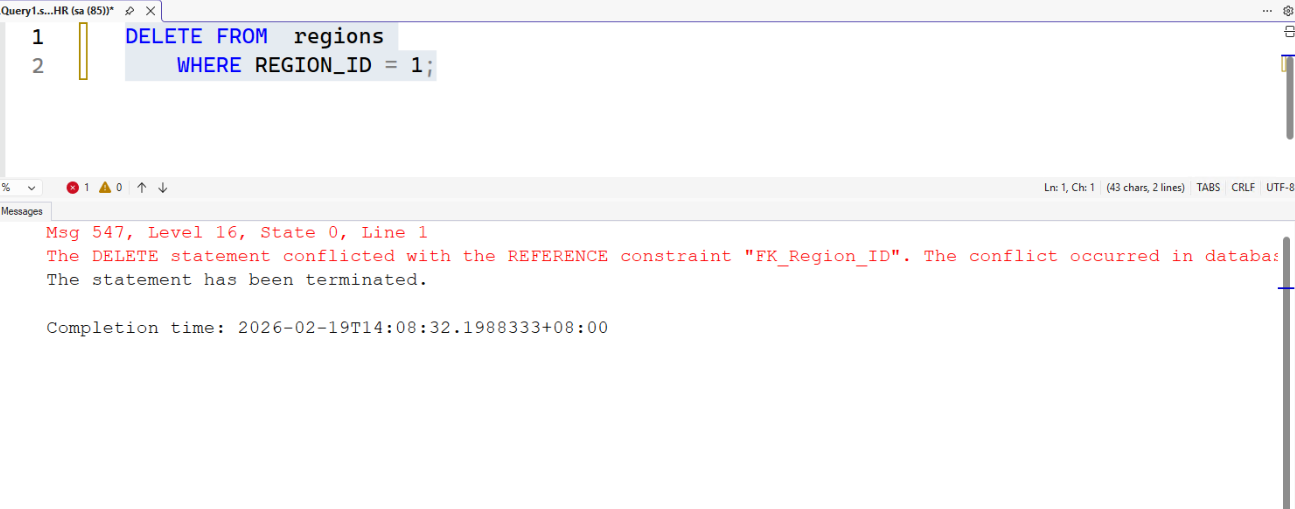
Task: Delete specific rows from the regions table
Code
1 2 | |
Shotscreen
Error : Can’t delete it because REGION_ID is used as a foreign key in another table.
Step by step
Use EXEC sp_help 'countries' ; to check the countries table structure
Note
Why we need check the countrie table, because REGION_ID is a foreign key in the countries table.
- Drop the constraint in the
countriestable usingALTER(DDL).
1 2 | |
- Then run the
DELETEagain (or make other required changes).
1 2 | |
After dropping the foreign key REGION_ID from the countries table, we are able to modify the regions table.
- Afterward, the foreign key constraint (
REGION_ID) should be re-added to thecountriestable.
1 2 3 4 5 6 | |
References
Instructor’s In-Class Demonstration