Module 7 Encapsulation
2026-04-21 12:11
Tags: #java
Author: Duke Hsu
1.0 Key concepts
-
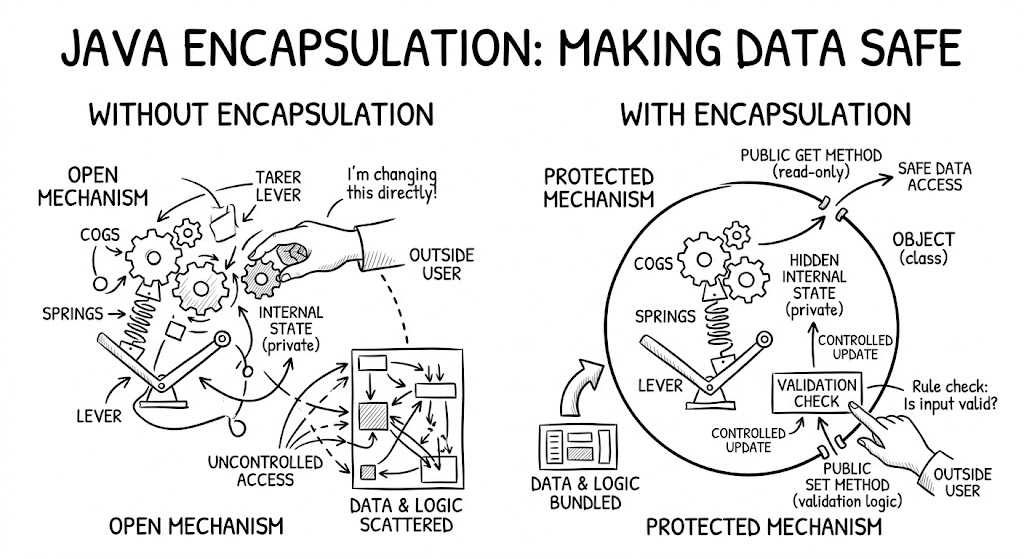
Encapsulation is wrapping data and methods together, hiding the internal details, and only showing what is needed to the outside world.
-
That meaning of Encapsulation , is to make sure that "sensitive" data is hidden from users.
-
To achieve this ,you must : declare class variables / attributes as
private -
Provide
publiget and set methods to access and update the value of aprivatevariable
1. 1 Types of Access Modifiers
-
Access Modifiers: Control visibility and accessibility of classes, attributes. ,methods, and constructors. (control the access level)
-
Non- Access Modifiers: do not control access level, but provides other functionality
| Same Class | Same Package | Sub Class | Other Packages | ||
|---|---|---|---|---|---|
| public | ✓ | ✓ | ✓ | ✓ | |
| private | ✓ | ✗ | ✗ | ✗ | |
| protected | ✓ | ✓ | ✓ | ✗ | |
| default | ✓ | ✓ | ✗ | ✗ |
1.2 Encapsulation and Data Handling
Encapsulation is the practice of bundling data (variables) and methods together, while hiding the internal data from direct access.
- We use methods (such as getters and setters) to read or update the data.
- The main purpose is to keep the data safe, controlled, and organized, preventing invalid changes and making the code easier to maintain.
Bank account Example:
1 2 3 4 5 6 7 8 9 10 11 12 13 14 15 16 17 18 19 20 21 22 23 24 25 26 27 28 29 30 31 32 33 34 35 36 37 38 39 40 41 42 43 44 45 46 47 48 49 50 51 52 53 54 55 56 57 | |
1.3 Getter and Setter Methods
- We use methods (such as getters and setters) to read or update the data.
Code Example:
1 2 3 4 5 6 7 8 9 10 11 12 13 14 15 16 17 18 19 20 21 22 23 24 25 26 27 28 29 30 31 32 33 34 35 36 37 38 39 40 41 42 43 44 45 46 47 48 49 50 51 52 53 54 55 56 | |
1.4 Using the this Keyword
- Within an instance method or a constructor , this is a reference to the current object, the object whose method or constructor is being called. You can refer to any member of the current object from within an instance method or a constructor by using this .
- TH most common reason for using the this keyword is because a field is shadowed by a method or constructor parameter.
Code Example:
1 2 3 4 5 6 7 8 9 10 11 12 13 14 15 16 17 18 | |
https://docs.oracle.com/javase/tutorial/java/javaOO/thiskey.html
1.5 Encapsulation for Class Design
- Use
privateattributes to hide data inside the class. - Provide controlled access through public methods (
getters and setters). - Avoid direct public variables to prevent unwanted changes.
- Add validation and rules inside methods to keep data safe and consistent.
- Make the class easier to understand and maintain by organizing data and behavior together.
1.6 Why Encapsulation is important in Java?
1.6.1 Keep data safe
- It hides important data inside the class (using
private). Other people cannot change the data directly. They can only use safe methods (likedeposit()orsetAge()). - Therefore No more negative age or negative bank balance by mistake.
1.6.2 Control how data is changed
- You can add rules inside the methods
- Example : Only allow deposit if
amount > 0 - Data always stays valid and correct.
1.6.3 Makes code easier to maintain
- If you change the inside logical later, other parts of the program don't break.
- The outside only sees the "buttons"(methods), not the complicated inside.
1.6.4 Reduces bugs
- When many people work on the same project, encapsulation stops them from accidentally breaking each other's code.
1.6.5 Organizes your code better
- Data and Method that work on that data stay together in one place.
- Clean and neat.
References
https://docs.oracle.com/javase/tutorial/java/javaOO/thiskey.html - Using the this Keyword - Oracle