Module 1 - Introduction SQL
01/22/2026
Tag: #ADV_DBMS
Made by Duke Hsu
History of SQL
- 1970 - E.F.Codd Develops Relational database concept
- 1974-1979 - System R with Sequel(Later SQL) created at IBM Research Lab
- 1979 - Oracle markets first Relational DB with SQL
- 1981 - SQL /DS First available RDBMS system on DOS / VSE
- Others followed: INGRES(1981),IDM(1982),DG/SGL(1984),Sybase(1986)
- 1986 - American National Standard Institute (ANSI) SQL Standard released
- 1989,1992,1999,2003,2006,2008 - Major ANSI Standard Updates
- Current: SQL is Supported by major database vendors
What is SQL?
- Structured Query Language(SQL) is the standard language used to interact with relational database.
- It allows users to store , retrieve, update and manage data efficiently through simple commands.
- It is known for its user-friendly syntax and powerful capabilities , SQL is widely used across industries.
SQL is pronounce "Sequel" or sometimes "ess-cue-ell"
Before SQL - Manual file systems - Slow retrieval - Inconsistent storaage After SQL - Structure data - Fast querying - Data integrity
Uses of SQL
SQL is used by organizations to interact with databases which store and manage data in a structured and efficient way .
Use SQL for: - Creating , Modifying, and deleting database tables and records - Inserting, updating, and deleting data in a database - Retrieving data from a database with SELECT statements - Grouping and aggregating data - Joining data from multiple tables - Creating views and stored procedures - Performing data analysis and data mining - Managing the security and permissions of a database - Monitoring and optimizing database performance - Backing up and restoring databases
How SQL Works
Key Components of a SQL System
- Databases: A databases is a structured collection of data. It organizes data into tables, which are like spreadsheets with rows(records) and columns(fields).
- Tables: Each table enforces rules and relationships among its columns for data integrity.
- Indexes: Indexes speed up queries by allowing the database to quickly locate data without scanning the entire table.
- Views: A view is a virtual table basically a saved SELECT statement you can query like a table.
- Transactions: A transaction groups multiple SQL operations into a single unit. It ensures all changes are applied successfully or none are, preserving data integrity (ACID properties)
- Security and Permissions: SQL includes tools to restrict access, letting DBAs assign who can do what whether it's accessing tables, executing procedures, or changing structures.
- Joins: Joins combine data from multiple tables based on relationships essential for querying across related datasets.
- Whitespace Allowed: Queries can span multiple lines but use spaces between keywords and names.
- Reserved Words: Avoid using SQL keywords as names. If needed, wrap them in quotes
"or backticks''
SQL Reserved Words:
https://support.microsoft.com/en-us/office/sql-reserved-words-b899948b-0e1c-4b56-9622-a03f8f07cfc8
Rules for Writing SQL Queries
By following these rules, queries will be well formed and well executed in any database. Would ensure consistency and functionality across databases.
- End with Semicolon
;Each SQL statement must end with a semicolon to execute properly.1 2
USE sys.database; GO; - Case Insensitivity: SQL keywords(e.g., SELECET, INSERT) are not case sensitive. However, table or column names may be case-sensitive depending on the DBMS.
SQL Environment
- Catalog: A set of schema that constitute the description of a database.
- Example: A shopping mall how many floor/ area / structure
- Schema: The structure that contains descriptions of objects created by a user
- Example: A shopping mall 1F: food / 2F: Cloth , shoes / 3F: Movies
- Tables / Views / Functions / Procedures
- Data Control Language: Commands that controls a database including administrating privileges and committing data
- DCL
- Control the user what they can do
- GRANT (授權) / REVOKE (收回權限) / DENY (拒絕)
- Normal user views data only / Admin can INSERT , DROP , UPDATE
- Data Manipulation Language: Commands that maintain and query a database
- DML
- SELECT / INSERT / UPDATE / DELETE
- Data Definition Language: Commands that define a database, including creating, altering , dropping tables and establishing constraints.
- CREATE
- ALTER
- DROP
- TRUNCATE
1 2 3 4 5 6 7 8 9 10 11 12 13 14 15 16 17 18 19 | |
SQL Environment consists of catalog, schema, and SQL command languages (DDL, DML, DCL) used to define, manipulate, and control a database.
Different SQL Commands or Queries
SQL Commands - DDL - DML - TCL - DQL - DCL
TCL - Transaction Control Language
The primary TCL commands are:
| Command | Description | Example |
|---|---|---|
COMMIT |
Permanently saves all changes made during the current transaction to the database. Once committed, changes cannot be rolled back. | COMMIT; |
ROLLBACK |
Undoes all changes made in the current transaction since the last COMMIT or ROLLBACK command, restoring the database to its previous state. |
ROLLBACK; |
SAVEPOINT |
Creates a named point within a transaction to which you can later roll back without affecting the entire transaction. | SAVEPOINT savepoint_name; |
SET TRANSACTION |
Configures the characteristics of the current transaction, such as the isolation level. | SET TRANSACTION ISOLATION LEVEL SERIALIZABLE; |
| Importance of TCL |
- Data Integrity: TCL ensures that the database remains in a consistent state, even in the event of system failures.
- Atomicity: It enforces the ACID property of atomicity, guaranteeing that all operations within a transaction either succeed as a whole unit or fail completely.
- Error Handling: It allows for controlled error handling through
ROLLBACKandSAVEPOINT, preventing partial or incorrect data updates.
COMMIT
1 2 3 4 5 6 7 8 9 10 11 | |
ROLLBACK
1 2 3 4 5 6 | |
SAVEPOINT
1 2 3 4 5 6 7 8 9 10 11 12 13 | |
TCL statements are used to manage transactions in a database, allowing changes to be committed or rolled back.
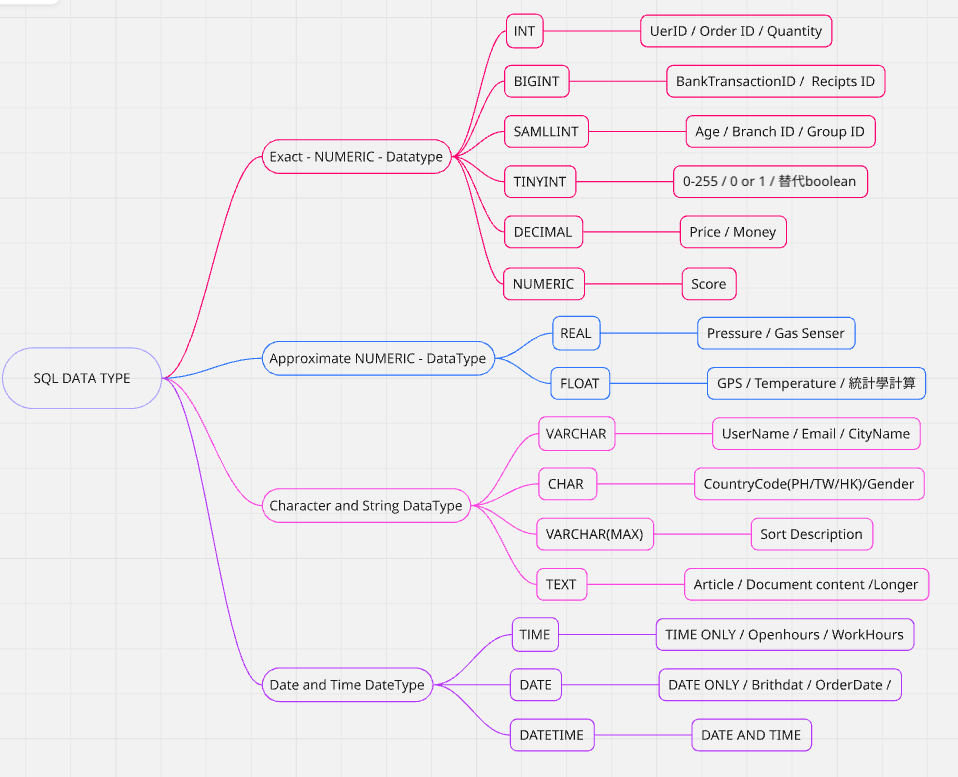
SQL Data types
| NUMERIC | BINARY | STRING | BOOLEAN | DATE/TIME | SPECIAL |
|---|---|---|---|---|---|
| INT | BINARY | CHAR | BOOLEAN | DATE | UUID |
| DECIMAL | BLOB | VARCHAR | TIME | AON | |
| FLOAT | TEXT | DATETIME | XML | ||
| NUMERIC | JSON |
https://learn.microsoft.com/zh-tw/sql/t-sql/data-types/decimal-and-numeric-transact-sql?view=sql-server-ver17
References: PPT module 1