Module 4 - Data Manipulation Language -Part 2
2026-02-07 21:03
Tags: #ADV_DBMS
Author: Duke Hsu
Module 4 - Data Manipulation Language -Part 2
Module Intended Learning Outcome
- Construct single table queries using SQL SELECT command
- Make use of different aggregated functions to customize output
Topic / Concept
Capabilities of SQL Select statement
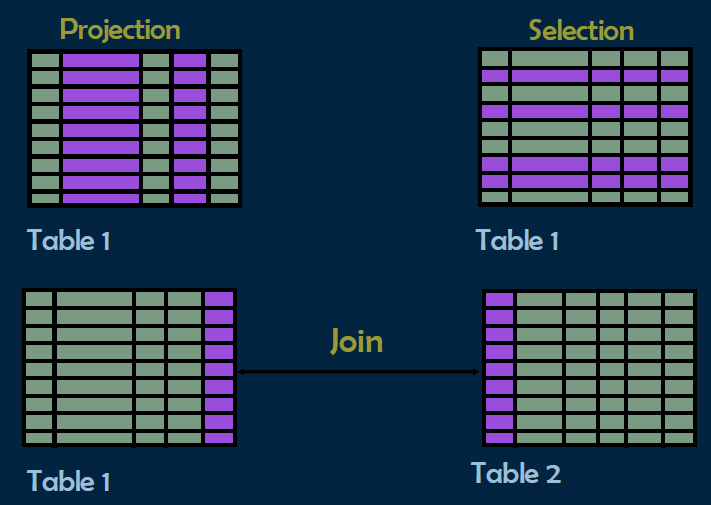
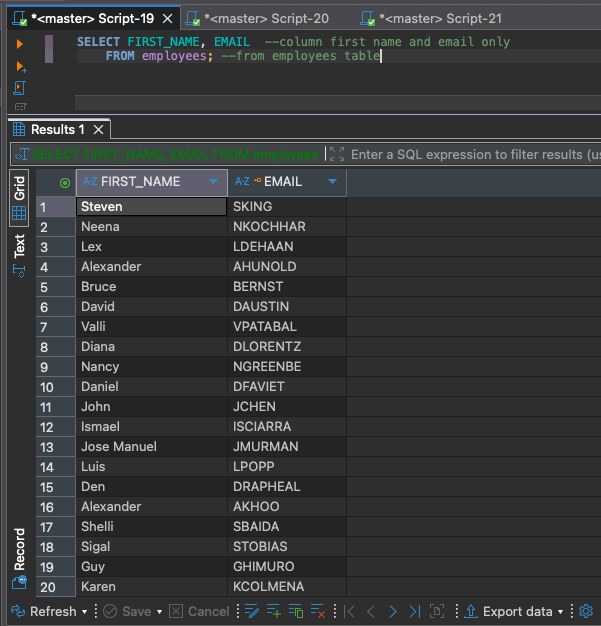
Projection (投影)
Use SELECT to select specific columns in a table.
使用 SELECT 選定table 中特定的某一些column .
Example:
1 2 | |
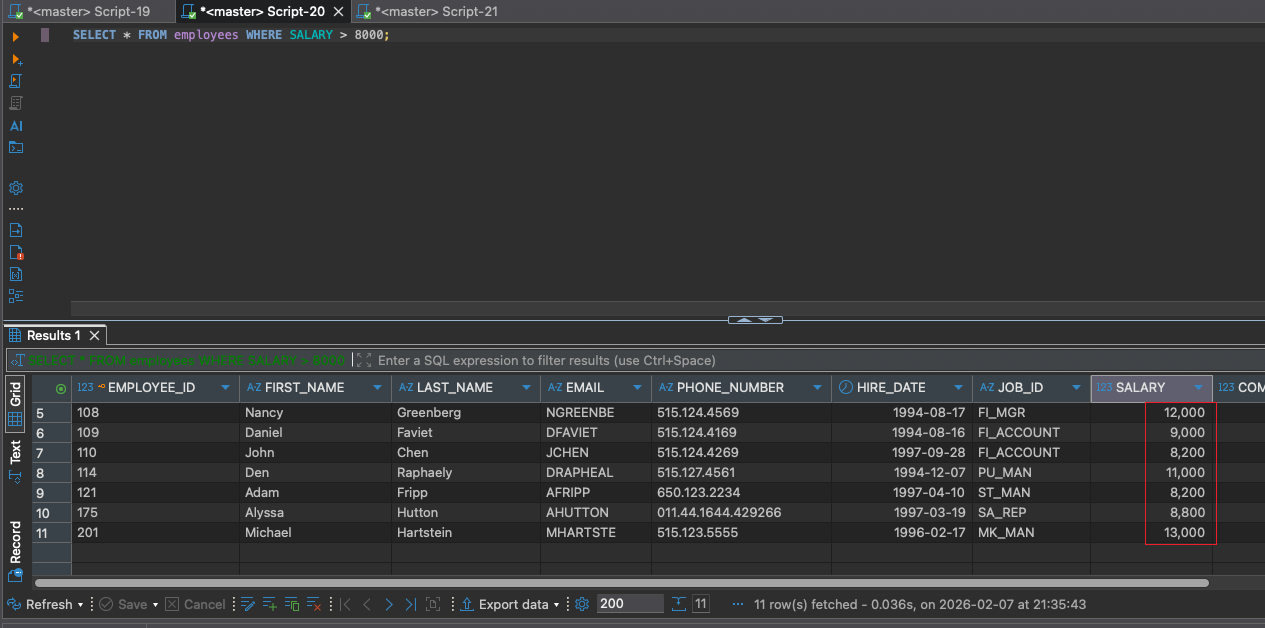
Selection (選擇)
Filter data (rows) based on specific condition. 通過特定的條件來篩選符合要求的數據(rows)
Example:
1 2 | |
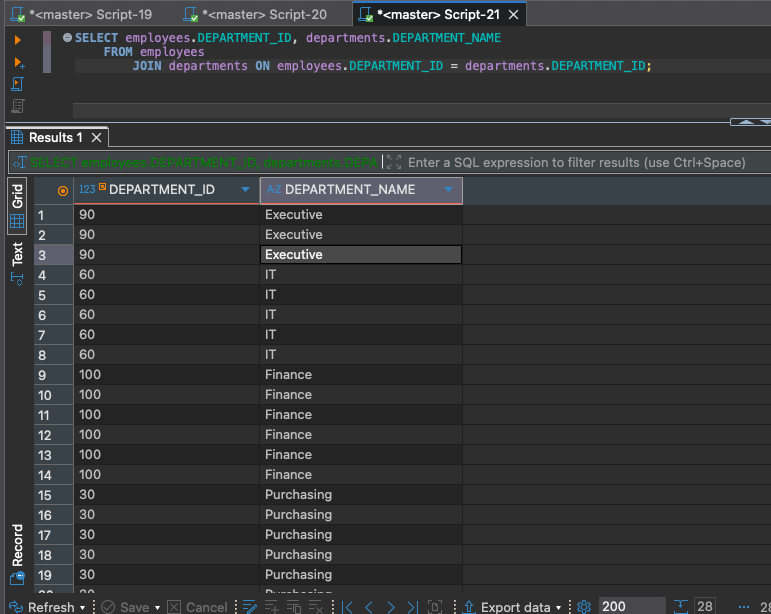
Join (連接)
Two different tables are linked together based on a common field/column (such as ID) and merged into a single set of data. 將兩張不同的表,基於某個共同的欄位(如 ID)關聯起來,合併成一組數據。
Example:
1 2 3 | |
其它還有 1. INNER JOIN 2. LEFT JOIN 3. RIGHT JOIN 4. FULL OUTER JOIN
請參閱文檔: [[JOIN TABLE]]
Select Statement
- Used for queries on single or multiple tables
- Clauses of the SELECT statement
1 2 3 4 5 6 | |
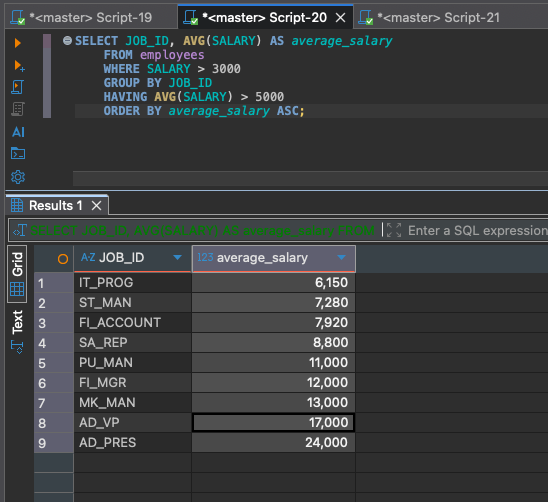
SQL Operators
SQL operators are symbols or keywords used to perform operations on data in SQL queries
Arithmetic Operators
Arithmetic Operators in SQL are used to perform mathematical operations on numeric data types in SQL queries.
| symbol | meaning | example |
|---|---|---|
| + | Addition | |
| - | Subtraction | |
| * | Multiplication | |
| / | Division | |
| % | Modulus |
Example:
1 2 3 4 5 6 7 | |
Comparison Operators
Comparison Operators in SQL are used to compare on expression's value to other expressions.
| symbol | meaning | example | ||
|---|---|---|---|---|
| = | Equal | |||
| != | Not Equal | |||
| <> | less than and great than | |||
| < | Less than | |||
| > | Great than | |||
| >= | Great than or Equal | |||
| <= | Less than or Equal |
1 2 3 4 5 6 7 8 | |
1 2 3 | |
Logical Operators
Logical Operators in SQL are used to combine or manipulate conditions in SQL queries to retrieve or manipulate data based on specified criteria.
| symbol | meaning | example | |
|---|---|---|---|
| AND | result should be True | ||
| OR | True or False | ||
| NOT | False |
Example:
1 2 3 4 5 6 7 8 9 10 11 12 13 14 15 | |
Bitwise Operators
Compound operators combine an operation with assignment. These operators modify the value of a column and store the result in the same column in a single step
| symbol | meaning | example | |
|---|---|---|---|
| & | AND | ||
| | | OR | ||
| ^ | XOR | ||
| ~ | NOT | ||
| << | Left move | ||
| >> | Right move |
8 bit
\(2^7 - 2^6- 2^5- 2^4- 2^3- 2^2- 2^1- 2^0\) \(128-64-32-16-8-4-2-1\)
| Bit position (from left to right) | 1 | 2 | 3 | 4 | 5 | 6 | 7 | 8 |
|---|---|---|---|---|---|---|---|---|
| Binary number 170 | 1 | 0 | 1 | 0 | 1 | 0 | 1 | 0 |
| Binary number 75 | 0 | 1 | 0 | 0 | 1 | 0 | 1 | 1 |
| Compare | \(1\&0\) | \(0\&1\) | \(1\&0\) | \(0\&0\) | \(1\&1\) | \(0\&0\) | \(1\&1\) | \(0\&1\) |
| AND Result | 0 | 0 | 0 | 0 | 1 | 0 | 1 | 0 |
00001010 = 2+ 8 = 10
| Bit position (from left to right) | 1 | 2 | 3 | 4 | 5 | 6 | 7 | 8 |
|---|---|---|---|---|---|---|---|---|
| Binary number 170 | 1 | 0 | 1 | 0 | 1 | 0 | 1 | 0 |
| Binary number 75 | 0 | 1 | 0 | 0 | 1 | 0 | 1 | 1 |
| Compare | 1|0 | 0|1 | 1|0 | 0|0 | 1|1 | 0|0 | 1|1 | 0|1 |
| OR Result | 1 | 1 | 1 | 0 | 1 | 0 | 1 | 1 |
11101011 = 128+ 64+32+8+2+1 = 235
Compound Operator
複合運算符 Compound operators combine an operation with assignment. These operators modify the value of a column and store the result in the same column in a single step.
| symbol | meaning | example | |
|---|---|---|---|
| += | |||
| -= | |||
| *= | |||
| /= | |||
| %= |
Example:
1 2 3 4 5 6 7 8 9 10 11 12 13 14 15 16 | |
Special Operators
BETWEEN .....AND .....IN(....)LIKEIS NULLEXISTS
The SQL IN Operator
- The
INoperator allows you to specify multiple values in aWHEREclause. - The
INoperator is a shorthand for multipleORconditions.
Syntax:
1 2 | |
Example:
1 2 3 4 | |
Nature language :
從 Customers 表中選擇所有記錄,條件是這些記錄的 Country 欄位是德國、法國或英國。
Select all records from the Customers table where the Country column is include Germany, France,UK.
The SQL BETWEEN Operator
- The
BETWEENoperator selects values within a given range. The values can be numbers, text, or dates. - The
BETWEENoperator is inclusive: begin and end values are included.(起始值和結束值都包含在內)
Syntax:
1 2 | |
Example:
1 2 3 4 | |
The SQL LIKE Operator
-
LIKE運算子用於在WHERE子句中搜尋資料行中的指定模式 (Pattern)。 -
通常與萬用字元 (Wildcards) 搭配使用:
-
%:代表零個、一個或多個字元。 -
_:代表單一個字元。
-
Syntax:
SQL
1 2 | |
Example:
SQL
1 2 3 | |
Natural Language:
從 Customers 表中選擇所有記錄,條件是 CustomerName 欄位的值是以 "a" 開頭。
Select all records from the Customers table where the CustomerName column starts with the letter "a".
The SQL IS NULL Operator
IS NULL運算子用於測試空值 (NULL values)。
Warning
不能使用比較運算子(如 = 或 !=)來測試 NULL,必須使用 IS NULL 或 IS NOT NULL。
Syntax:
SQL
1 2 | |
Example:
SQL
1 2 3 | |
Natural Language:
從 Customers 表中選擇所有記錄,條件是 Address 欄位沒有數值(為空值)。
Select all records from the Customers table where the Address column has a NULL value.
The SQL EXISTS Operator
-
EXISTS運算子用於測試子查詢 (Subquery) 是否傳回任何記錄。 -
如果子查詢傳回一筆或多筆記錄,則傳回
TRUE。
Syntax:
SQL
1 2 | |
Example:
SQL
1 2 3 4 5 | |
Natural Language:
從 Suppliers 表中選擇供應商名稱,條件是該供應商在 Products 表中有至少一項產品價格低於 20。
Select the SupplierName from the Suppliers table if the subquery returns any records (i.e., if there is at least one product with a price less than 20 for that supplier).
Note
SQL 聚合函數(Aggregate Functions)用於對一組值執行計算,並傳回單一值。除了 COUNT(*) 之外,聚合函數都會忽略空值 (NULL)。
Warning
Operand data type varchar is invalid for sum operator.
The SQL COUNT() Function
COUNT()函數傳回符合指定條件的資料列數目。
Syntax:
1 2 | |
Example:
1 2 3 | |
The SQL SUM() Function
- The
SUM()returns the total sum of a numerical column
Syntax :
1 2 | |
Example:
1 2 | |
The SQL MIN() and MAX() Function
- The
MIN()returns the smallest value within the selected column - The
MAX()returns the largest value within the selected column
Example:
1 2 3 4 5 6 7 8 | |
The SQL AVG() Function
- The
AVG()function returns the average value of a numerical column
Example:
1 2 | |
Using Aliases With a Space Character
- If you want your alias to contain one or more spaces, like "My Great Products", surround your alias with square brackets or double quotes.
Example
Using[square brackets] for aliases with space characters:
1 2 | |
Using "double quotes" for aliases with space characters:
1 2 | |
SQL SELECT DISTINCT Statement
- The
SELECT DISTINCTstatement is used to return only distinct (different) values. - SELECT DISTINCT 语句的确是用来返回某个列中不重复的值。它确保返回的结果集中没有重复项。
Syntax:
1 2 | |
Example:
- Select all the different countries from the "Customers" table:
1 2 | |
References:
MSSQL Group Functions - https://learn.microsoft.com/zh-cn/sql/t-sql/functions/aggregate-functions-transact-sql?view=sql-server-ver17