Module 3 - Java Basics
2026-02-26 16:01
Tags: #java
Author: Duke Hsu
Module 3 - Java Basics
Module Topic
Data Types
-
Variables
-
Data Types
-
Constants
Operators and Expressions
+ - * / .....
Scanner
-
Input
-
Output
-
nextLine()
Example Application in OOP
Datatypes and Variables and Constants
Concept Define
-
Variables are named memory locations used to store data that can change during program execution.
-
Data Types define the type and size of data a variable can store.
-
Constants are values that cannot be changed once assigned . In Java, constants are declared using the
finalkeyword.
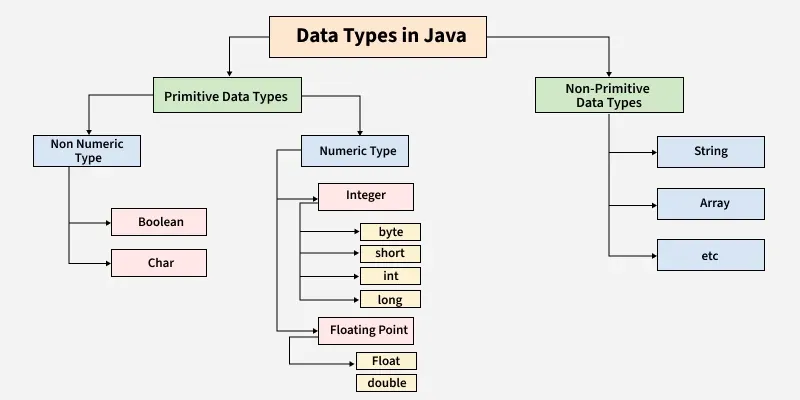
Primitive Data Types in Java
| DATA TYPE | DESCRIPTION | EXAMPLE | DEFAULT VALUE (FOR FIELDS) |
|---|---|---|---|
| byte | very small whole numbers | byte b = 10; |
0 |
| short | small whole numbers | short s = 100; |
0 |
| int | whole numbers | int age = 18; |
0 |
| long | very large whole numbers | long follows = 9888222333L; |
0L |
| float | decimal numbers(single precision) | float price = 99.5f |
0.0f |
| double | decimal numbers (double precision) | double salary = 25000.78; |
0.0d |
| char | a single charater | char grade ='A'; |
'\u0000' |
| boolean | true of false values | boolean isPassed = true; |
false |
Note
String or any Object default values is NULL
Operators
-
Arithmetic Operators
- Used to perform mathematical operations.
-
Assignment Operators
- Used to assign values to variables
-
Relational (Comparison ) Operators
- Used to compare two values and return a boolean result
-
Logical Operators
- Used to combine of negate boolean conditions, allowing for complex decision-making in control flow statements.
-
Unary Operators
- Unary operators in java perform operations on a single operand. They include operations like
negation(-),increment(++), anddecrement(--),allowing for modifications or evaluations of a single value.
- Unary operators in java perform operations on a single operand. They include operations like
-
Ternary(Conditional ) Operator
- The ternary operator in java is a concise way to evaluate a condition and return one of two values based on that condition. It uses the syntax
condition ? valueIfTrue : valueIfFalse,enabling shorthand conditional expressions.
- The ternary operator in java is a concise way to evaluate a condition and return one of two values based on that condition. It uses the syntax
Tables and Example
Arithmetic
| OPERATOR | DESCRIPTION | EXAMPLE |
|---|---|---|
| + | addition | a + b |
| - | subtraction | a - b |
| / | division | a / b |
| % | modulus(remainder onec) | b % a |
| * | multiplication | a * b |
Assignment
| OPERATOR | EXAMPLE | MEANING |
|---|---|---|
| = | x = 5 | assign 5 to x |
| += | x += 2 | x = x + 2 |
| -= | x -= 1 | x = x - 1 |
| *= | x *= 3 | x = x * 3 |
| /= | x /= 2 | x = x / 2 |
Relational (Comparison)
| OPERATOR | DESCRIPTION | EXAMPLE |
|---|---|---|
| == | equal to | x == y |
| != | not equal tp | x != y |
| > | greater than | a > b |
| < | less than | b < a |
| >= | greater than or equal to | c >= b |
| <= | less than or equal to | c <= a |
Logical Operators
| OPERATOR | DESCRIPTION | RETURN |
|---|---|---|
| && | AND | all true return true |
| || | OR | if one is true , then true |
| ! | NOT | true / false |
Unary Operators
| OPERATOR | DESCRIPTION | RETURN |
|---|---|---|
| + | Unary plus operator | indicatespositive value (numbers are positive without this, however) |
| - | Unary minus operator | negates an expression |
| ++ | Increment operator | Increments a value by 1 (遞增) |
| -- | Decrement operator | decrements a value by 1 (遞減) |
| ! | Logical complement operator | inverts the value of a boolean(反轉) |
1 2 3 4 5 6 7 8 9 10 11 12 13 14 | |
Ternary (Conditional) Operator
Syntax: condition ? valueTrue : valueFalse
1 2 3 | |
More Operator plz check : https://docs.oracle.com/javase/tutorial/java/nutsandbolts/opsummary.html
Order of Precedence(Highest to Lowest)
| PRECEDENCE LEVEL | OPERATORS | OPERATOR CATEGORY |
|---|---|---|
| 1 (Highest) | () | |
| 2 | ++, --,! | Unary Operators |
| 3 | *, /, % | Arithmetic |
| 4 | < , > ,<=, >= | Relational (Comparison) |
| 5 | == , != | Relational (Comparison) |
| 6 | && | Logical Operators |
| 7 | ` | |
| 8 | = , +=, -= , *= , /= | Assignment |
Input and Output Using Scanner
The Scanner Class
- The Scanner class is part of the java.util package, and allows programs to accept input from users.
Common Scanner Methods.
-
nextlnt(): Reads the next integer input from the user. For example, if the user enters "42", it stores 42 as an integer. -
nextDouble(): Reads the next double (decimal) number input. For instance, if the user enters "3.14", it stores 3.14 as a double. -
nextLine(): Reads an entire line of text input, including spaces, until the user presses Enter. For example, if the user enters "Hello World", it stores "Hello World" as a string. -
nextBoolean(): Reads the next input value as a boolean (true or false). If the user types "true" or "false", it stores that value as a boolean. -
next(): Reads the next token (word) until white space.
References
Module 3 - OOP Java Basics.pdf
Summary of Operators - https://docs.oracle.com/javase/tutorial/java/nutsandbolts/opsummary.html
Scanner - java platform -https://docs.oracle.com/javase/8/docs/api/java/util/Scanner.html
Java Data Types - https://www.geeksforgeeks.org/java/java-data-types/